
Stellar Smartguard

Simple Android Device Management for Growing Businesses

Stellar Smartguard helps small and growing businesses manage company-owned Android devices with practical controls for security, applications, device usage, productivity, and device visibility. It gives administrators a simpler way to enroll devices, apply policies, monitor activity, and respond when devices are lost or misused.

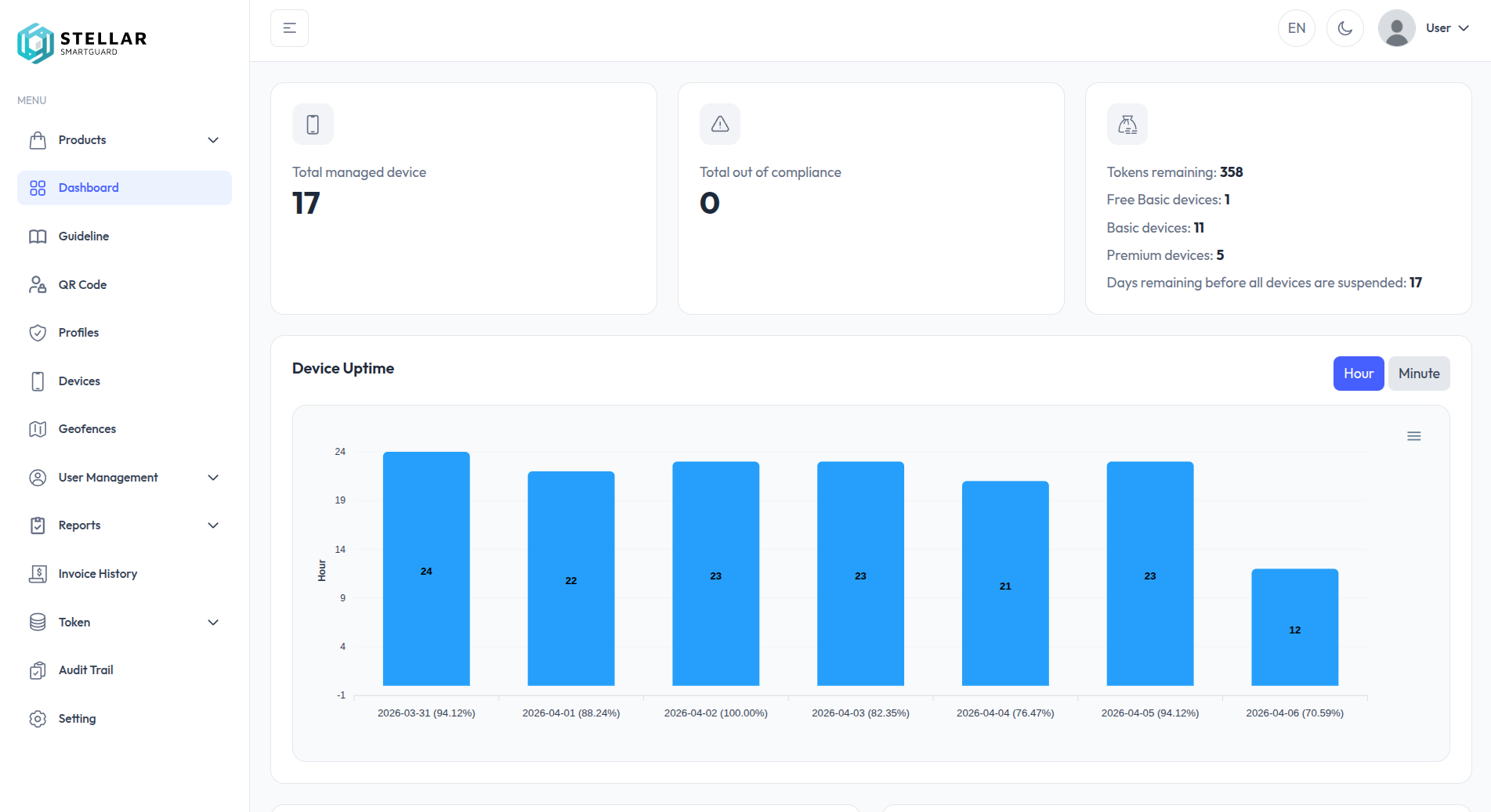
Stellar Smartguard · Dashboard
Stellar Smartguard dashboard — managed devices, compliance, tokens, and device uptime
Core Capabilities

Essential Capabilities for Everyday Device Management

Enrollment & Provisioning

Enroll company-owned Android devices through Zero Touch or QR Enrollment and apply management configurations from the beginning of device setup.

Device Policy Management

Apply centralized settings such as GPS enforcement, automatic time, account restrictions, password requirements, and factory-reset controls.

Application Control

Manage which applications can be installed and used on company devices while restricting unauthorized application installation.

Productivity Monitoring

Monitor screen time, application usage, data consumption, device uptime, and other activity indicators.

Location & Geofence

Track device locations and define operational zones to identify devices entering or leaving designated areas.

Lost Device Protection

Remotely lock lost devices, activate an alarm, and display recovery contact information on the lock screen.

Featured Capabilities

Keep Company Devices Secure, Productive, and Under Control

Monitor how company-owned Android devices are used, apply practical usage and security policies, and respond when devices move outside expected operational conditions.

Low Productivity Report
Example low-productivity device data with masked identifiers.
DeviceTimeProfileApplicationLimitsUsage
Field Device •••• 212200:00:50SalesYouTube1–50 MB0 Bytes
Demo Unit •••• 083400:00:50SalesYouTube1–50 MB0 Bytes

View device information, application usage, screen time, data usage, uptime, recent activity, and location from the management dashboard.

Non-Productive Devices Summary

Here is the summary of non-productive devices for profile: Sales Team

Total Active Devices
12
Screen Time Devices
3 (Min: 60 min, Max: 120 min)
Data Usage Devices
2 (Min: 10 MB, Max: 20 MB)
Inactive in Operational Time
1 (Start: 16:00, End: 18:00)

Please review these devices and take the necessary actions.

Device identifiers are hidden in email summaries.
Define screen-time limits, data-usage limits, and operational hours, then identify devices that fall below configured productivity conditions.

Detail Profile
Example approved application list.
IconApp NamePackage NameActions
WhatsApp Businesscom.whatsapp.w4b
LinkedIncom.linkedin.android

Apply device settings and application restrictions to maintain consistent configuration, reduce unauthorized changes, and keep company-owned devices focused on business use.

Detail Geofence
Jakarta geofence mapA street map of Jakarta with a green polygon marking the designated operational zone.TangerangJakarta UtaraJakartaBekasiDepokTangerang Selatan

Monitor whether devices remain within designated operational areas and remotely lock devices when they are lost or suspected to be outside expected use.

How It Works

Get Company Devices Managed in a Few Steps

  1. 01

    Enroll Company Devices

    Register supported Android devices through QR Enrollment or Zero Touch.

  2. 02

    Apply Management Policies

    Configure security settings, application access, productivity rules, and operational controls.

  3. 03

    Monitor & Respond

    Use the dashboard to monitor device activity, productivity, location, compliance, and device status.

Use Cases

Built for Practical Company Device Management

Company-Owned Employee Devices

Manage Android devices provided to employees with consistent applications, security policies, and usage controls.

Field & Operational Devices

Manage company-owned Android devices used by field teams with visibility into location, activity, application usage, and operational status.

Dedicated Business Devices

Keep company devices focused on approved business applications and reduce unauthorized application installation or non-business use.

Device Loss & Recovery

Respond when a company device is lost by monitoring its location and applying remote lock protection.

Shared & Operational Devices

Manage Android devices used across shifts or operational teams with consistent applications, policies, usage controls, and device visibility.

Why Stellar Smartguard

Android Device Management Made Practical for Growing Businesses

Simple to Use

Straightforward administration for everyday device management.

Built for Android

Focused on company-owned Android devices without multi-OS management complexity.

Practical Security Controls

Apply security, application, productivity, and operational policies according to how devices are intended to be used.

Designed for Growing Businesses

A practical management approach for organizations that need essential Android device control as their operations grow.

Insights

Highlights & latest news.

The latest milestones and updates from Stellar Smartguard.

Take Control of Your Company Android Devices

Explore Stellar Smartguard for practical Android device management across security, applications, productivity, and daily operations.

FAQ

Frequently asked questions.

Which devices does Stellar Smartguard support?

Stellar Smartguard focuses on company-owned Android device management for small and growing businesses.

How are devices enrolled?

Company-owned Android devices are enrolled through QR Enrollment or Zero Touch, and management configurations are applied from the beginning of device setup.

Can I monitor how company devices are used?

Yes. Stellar Smartguard shows screen time, application usage, data consumption, device uptime, recent activity, and location, and can flag devices that fall below configured productivity conditions.

What happens if a company device is lost?

You can remotely lock the device, activate an alarm, and display recovery contact information on the lock screen. Geofencing also helps identify when devices leave designated operational areas.

Who is Stellar Smartguard for?

Small and growing businesses that need practical control over company-owned Android devices without enterprise-level complexity.